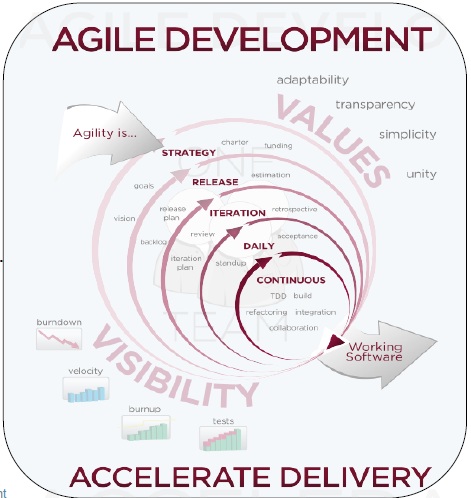
Traditional PM Methods Vs Agile PM Methods

Traditional Project Management
  1. Detailed and rigid planning with formal and controlled change procedures.
  2. Formal task breakdown and allocation, may not be adaptable.
  3. Human resources can be changed easily which might lead to morale issues.
  4. Command and control leadership style.
  5. Upfront stakeholder and scope identification which increases the cost of change.
Agile Project Management :
  1. “Plans are nothing, planning is everything.” - Dwight D. Eisenhower
  2. Collaborative and prioritized task breakdown.
  3. Self-organizing, empowered, cross-functional, cohesive teams leading to high morale.
  4. Servant leadership style. Empowering, guiding, coaching.
  5. High team-stakeholder involvement and focus always on the most important scope needed now.

Twelve Principles of Agile Software


1.Our highest priority is to satisfy the customer through early and continuous delivery of valuable software.
2.Welcome changing requirements, even late in development. Agile processes harness change for the customer's competitive advantage.
3.Deliver working software frequently, from a couple of weeks to a couple of months, with a preference to the shorter timescale.
4.Business people and developers must work together daily throughout the project.
5.Build projects around motivated individuals. Give them the environment and support they need, and trust them to get the job done.

Agile Software Development


  1. Empirical and adaptive.
  2. Iterative and incremental.
  3. Just-enough planning.
  4. Just-enough development.
  5. Adaptable to scope changes.
  6. Collaborative and whole-team.
  7. User centric.
  8. Value driven.


7 Wastes in Software Development


1. Partially Done Work.
2. Extra Features.
3. Relearning.
4. Handoffs.
5. Delays.
6. Task Switching.
7. Defects.

Planning Poker in Scrum


  1. A Moderator, who will not play, chairs the meeting.
  2. The Product Owner provides a short overview.
  3. The team asks questions and clarifies assumptions and risks.
  4. A summary of the discussion is recorded by the Project Manager.
  5. Each individual lays a card face down representing their estimate.
  6. Everyone calls their cards simultaneously by turning them over.
  7. People with high estimates and low estimates are given a time box to offer their justification for their estimate and then discussion continues.
  8. Repeat this process until a consensus is reached.
 Planning Poker is a fast, card based approach to team estimation. Team members are given cards with the numbers 0, 1, 2, 3, 5, 8, 13, 20, 40, and 100 on them to represent development effort estimates.
User stories are presented to the team and discussed as a group to round out understanding, Then everyone selects a card that represents their estimated effort for the development. The cards are kept private until everyone has selected a card and then they are all revealed together.
If the resulting estimates are close then it is safe to record the estimate and move onto the next story. If there is significant divergence then people are invited to discuss why they believe it will be so different (for example last time we added a column to the account table it took 8hrs to regression test the legacy applications). Then in light of this new information people estimate again, as before only revealing their cards when everyone has selected a card. The process iterates until sufficient consensus has been reached.
Planning Poker takes the group based consensus building and anonymous estimating concepts of Wideband Delphi estimation and packages them in a faster, more enjoyable format. 


Steps to Successful Story Point Estimation


1. Identify base stories.
2. Talk through the requirements of the story.
3. Discuss and jot down things you want to remember when implementing this story.
4. Some of these questions team ask themselves when they start sizing.
5. Find some point of relative comparison.
6. Reach a consensus among entire team present as to the size of the story as per definition of done.
7. Validate that your estimates are internally consistent among stories as you go along.
8. Periodically ensure that all of the 1′s are about the same, all of the 2′s match, etc.

Scurm Estimation using Story Points


  1. An abstract number to measure size of a feature.
  2. Does not mean anything in isolation, but conveys relative size of features when compared.
  3. Different teams size-up the same features differently but the relative measures between features might be the same.
  4. Fibonacci series preferred as story points: 1, 2, 3, 5, 8, 13, 21, …
  5. Geometric series also preferred: 1, 2, 4, 8, 16, 32, …
Story point estimation allows us to:
  1. Rapidly estimate long-term product backlogs without requiring detailed specifications and complicated dependency charting
  2. Provide broader insight from diverse functional experts (which offers checks and balances and less point sensitivity) to ensure that estimates aren’t being padded nor under-baked
  3. Ensure that the entire ‘brains trust’ of the team is able to understand and assess the merits of the requirements, allowing for early detection of any potential issues as well as areas for improvement
  4. Leverage the knowledge gained from completing legacy work
  5. Actually have some fun whilst conducting a traditionally mundane and frustrating task. Planning Poker sessions are interactive, lively and much faster than traditional estimation marathons
  6. Sound pretty snazzy as talking about your ‘team velocity’ is way more exciting than mumbling something about your ‘team rate of progress’ – ok maybe leave that one out…


The Sprint Planning Meeting – Warnings


  1. The product owner does not attend the meeting.
  2. The scrum master does not attend the meeting.
  3. A major part of the team is missing from the meeting.
  4. The product backlog is not prioritized or groomed.
  5. Other stakeholders are part of this meeting and prioritizing activities.
  6. The Sprint goal is vague.
  7. Team doesn’t estimate even the top priority user-story into tasks.
  8. The scrum master and/or product owner are deciding tasks taken into sprint backlog.
  9. The scrum master and/or product owner are doing the estimates.
  10. Meeting does not get over in the specified time-box.

Agile Estimation Basics


  1. Traditional PM methods estimate by activities – Break the scope into activities, estimate the duration of activity, add them up.
  2. Agile PM methods estimate by features – First estimate size of features, then estimate duration of features.
  3. Estimation of size happens as early and as often as possible.
  4. Estimation of duration happens as late and as often as possible.
  5. Always be a whole-team activity.
  6. Estimates of size: User story or ideal days.
  7. Estimate of Duration = [sum of all user stories or all ideal days] / [velocity]

Velocity in Scrum

velocity is the amount of work that a team can complete in a specified period of time.

The "amount of work" is the total number of story points if the team estimates by size, or the total number of "ideal hours spent on tasks. All acceptance criteria must be met in order for a story to be considered complete. The "specified period of time" is usually an iteration between one and four weeks long.

Velocity is simply work divided by time — story points per iteration or ideal hours per iteration.

Velocity is a measurement of how much the team gets done in an iteration ( called as Sprint in Scrum ). Velocity is what actually got done in the last iteration not what is planned.

In Scrum it is measure in Story points. Each feature in scrum is a story. A story has points. Points can be anything you come up with.

Highlight points for Velocity in scrum
  1. Velocity = [Total number of story points moved to ‘done’ in a sprint].
  2.  Product owner identifies a user-story as ‘done’/’not done’ during sprint review.A metric to measure of the Scrum team’s rate of progress.
  3. Velocity is calculated at the end of every Sprint after Sprint review.
  4. Velocity for a team improves over time based on closing the continuous improvement areas identified in Sprint retrospective.


User Story in Agile


User stories are used with Agile software development methodologies as the basis for defining the functions a business system must provide, and to facilitate requirements management. It captures the 'who', 'what' and 'why' of a requirement in a simple, concise way, often limited in detail by what can be hand-written on a small paper notecard. User stories are written by or for the business user as that user's primary way to influence the functionality of the system being developed. User stories may also be written by developers to express non-functional requirements (security, performance, quality, etc.)
  1. A user story represents a value adding requirement of the product.
  2. Contract between development team and PO that discussion will take place before implementation.
  3. This usually follows the following template:"As a <user type> I want to <do some action> so that <desired value added result>“.
  4. INVEST criteria: Independent, Negotiable, Valuable, Estimable, Small, Testable.
  5. Implemented by a development team in one sprint.
  6. User stories are Complemented by with conditions of satisfaction.


User stories Vs Use Cases


User stories
  1. Provide a small-scale and easy-to-use presentation of information. Are generally formulated in the everyday language of the user and contain little detail, thus remaining open to interpretation. They should help the reader understand what the software should accomplish.
  2. Must be accompanied by Acceptance Testing procedures (acceptance criteria) for clarification of behaviour where stories appear ambiguous
Use Cases
  1. Describe a process and its steps in detail, and may be worded in terms of a formal model. A use case is intended to provide sufficient detail for it to be understood on its own. A use case has been described as “a generalized description of a set of interactions between the system and one or more actors, where an actor is either a user or another system”.
  2. May be delivered in a stand-alone document.

Burn-up chart


  • A chart displaying the current progress of the sprint and estimated time to burn down the complete product backlog.
  • Displays the value earned through all Sprints.
  • X-axis is the iterations since start of the project.
  • Y-axis is the total ‘done’ effort.
  • The green line is the total scope. The dashed line extrapolates the estimated total scope.
  • The red line is the total scope ‘done’ for each iteration. The dashed line extrapolates the estimated time required to burn down entire scope based on Scrum team’s current velocity.

Sprint Burndown chart

By reviewing a sprint burn down report, you can track how much work remains in a sprint backlog, understand how quickly your team has completed tasks, and predict when your team will achieve the goal or goals of the sprint.

Burn down chart displays the remaining effort for a given period of time.

When they track product development using the Burn down chart, teams can use a sprint Burn down chart and a release Burn down chart. This article concentrates on the sprint Burn down chart as it is used on daily basis.
Sprint Burn down Chart
  • A chart displaying the current progress of the sprint.
  • Displays the remaining work in the current Sprint.
  • Updated by the development team everyday.
  • X-axis is the days remaining in the Sprint.
  • Y-axis is the total estimated effort remaining to get the tasks identified for the Sprint to done.
  • Green line is the ideal Burndown based on number of hours committed to in the Sprint.
  • Red line is the daily estimations of remaining work updated by development team daily.


Definition of Done (DoD) in Agile

 Done Done means the coding is done, it’s been tested, installers and deployment packages have been created, user manuals have been updated, architecture docs have been updated, etc.
  1. A transparent exit criteria to decide whether an item in the product backlog is completely implemented.
  2. An input for the development team to decide how much work it can commit to deliver in a sprint.
  3. As the scrum team matures the exit-criteria become more strict.


Actually done means to finish below all mentioned activity :


Column One

User Story Clarity
User stories selected for the sprint are complete with respect to product theme, understood by the team, and have been validated by the detailed acceptance criteria.

Tasks Identified
Tasks for selected user stories have been identified and estimated by the team.

Build and package changes 
Build and package changes have been communicated to the build master. These changes have been implemented, tested and documented to ensure that they cover the features of the sprint.

Product owner approval
Each finished user story has been passed through UAT (User Acceptance Testing) and signed off as meeting requirements

Updating Product Backlog
All features not done during the sprint are added back to the product backlog. All incidents/defects not handled during the sprint are added to the product backlog.

Column Two

Environment ready
  • Development environment is ready with all third-party tools configured.
  • Staging environment is ready.
  • Continuous integration framework is in place. The build engine is configured to schedule hourly, nightly, and release builds.
  • Desired build automation is in place. Why "desired"? Because there is no end to build automation :)
  • Test data for the selected features has been created

Design complete
Design analysis is complete as per the user story or theme. UML diagrams are either created or updated for the feature under development.

You might need to prototype various components to ensure that they work together.  Wireframes and prototype have been created and approved by the respective stakeholders.

Unit test cases written
Unit test cases have been written for the features to be developed.

Documentation Ready
Documentation (Just enough or whatever the team agrees to) to support the sprint demo is ready

Pre-Release builds 
Pre release builds (hourly/nightly) have been happening and nightly build reports have been published on regular basis.
The following could/should be part of pre-release builds:
  1. Compile and execute unit test cases (mandatory)
  2. Creation of cross reference of source code
  3. Execution of automated code reviews for verification of coding rules
  4. Code coverage reports are generated
  5. Detection of duplicate source code
  6. Dependency analysis and generation of design quality matrix (static analysis, cyclomatic complexity)
  7. Auto deployment in staging environment
  8. It comes down to build automation; there is no end to what can be achieved from automated hourly, nightly builds. The team along with the product owner needs to decide on how much build automation is required.
Column Three

Code Complete
Source code changes are done for all the features in the “to do” list.” Source code has been commented appropriately.

Unit testing is done
Unit test cases have been executed and are working successfully

Code Refactoring
Source code has been refactored to make it comprehensive, maintainable and, amenable to change.

A common mistake is to not keep refactoring in the definition of done. If not taken seriously, refactoring normally spills out to next sprint or, worse, is completely ignored.

Code checkin 
  1. Source code is checked in the code library with appropriate comments added.
  2. If project is using tools which help in maintaining traceability between user stories and the respective source code, proper checkin guidelines are followed.
Code merging and tagging
Finalized source code has been merged with the main branch and tagged appropriately (merging and tagging guidelines are to be used)

Column Four

Automated Code reviews
Automated code review has been completed using the supported tools/technologies. Violations have been shared with the team and the team has resolved all discrepancies to adhere to the coding standard. (Automated code reviews should be hooked up with CI builds.)

Peer reviews
Peer reviews are done. If pair programming is used, a separate peer review session might not be required.

Code coverage is achieved
Code coverage records for each package are available and whatever the team has decided as the minimum benchmark is achieved.

Project metrics are ready
Burndown chart has been updated regularly and is up to date.

Release Build
  1. Build and packaging
  2. A Build (successful) is done using continuous integration framework. Change log report has been generated from Code Library and Release notes have been created. Deliverables have been moved to release area.
  3. Build deployment in staging environment
  4. Build deliverables are deployed in staging environment. If it is easy, this step should be automated.
Column Five

Functional testing done
Automated testing
All types of automated test cases have been executed and a test report has been generated. All incidents/defects are reported.
Manual testing
Quality assurance team has reviewed the reports generated from automation testing and conducted necessary manual test cases to ensure that tests are passing. All incidents/defects are reported.
Build issues
If any integration or build issues are found, the necessary steps are repeated and respective “Done” points are adhered to.
Regression testing done
Regression testing is done to ensure that defects have not been introduced in the unchanged area of the software.
Performance testing done
A common mistake is to not keep performance testing in the definition of done. This is an important aspect. Most performance issues are design issues and are hard to fix at a later stage.
Acceptance testing done
Each finished user story has been passed through UAT (User Acceptance Testing) and signed off as meeting requirements (see also Product Owner Approval).
Closure
All finished user stories/tasks are marked complete/resolved. Remaining hours for task set to zero before closing the task.

The Sprint Backlog


  1.  This is a forecast given by the development team as to what functionality will be done in the next increment and how it will be delivered.
  2. Contains a set of product backlog items identified for a Sprint and the tasks needed to get those items to done.
  3. Tasks are estimated in hours.
  4. This is a dynamic document evolving throughout the Sprint.
  5. Development team updates the backlog as it works through the plan and understands more the work needed to be done.
  6. New work is estimated and added to the backlog by development team.
  7. Estimations for remaining work is updated by development team.
9 Tips for Creating a Good Sprint Backlog:
  1. Involve every team member in the process.
  2. Discuss how every item should be implemented.
  3. Have a definition of done.
  4. Identify all kinds of tasks.
  5. Don't estimate tasks at all. 
  6. Don't assign tasks up front
  7. Review the sprint commitment. 
  8. Don't use too much time.
  9. Evolve the Sprint Backlog during the sprint.

The Product Backlog


  1. The single source of requirements for the product.
  2. Prioritized list of requirements arranged as value-creating user stories ordered by business value.
  3. The user-stories nearer the top are clear and detailed than those below.
  4. User-stories taken into sprint backlog are fine-grained enough to be done in a Sprint.
  5. User-stories at the bottom are usually vague in scope. They are called Epics (fairly vague ideas) or Themes (extremely vague ideas).
  6. This document exists and evolves all through the product’s lifetime.
  7. Editable by anyone but owned and prioritized by Product Owner.
"The product backlog is an ordered list of everything that might be needed in the product and is the single source of requirements for any changes to be made to the product."
At its core, the product backlog is an ordered list of items that is managed by a person with the ability to understand the business’ needs.
The product backlog is used to:
capture requests for modifying a product.  This can include add new features, replacing old features, removing features and fixing issues; and ensure the delivery team is given work which maximizes the business benefit to the owner of the product


Artifacts in the Scrum Framework

List of Artifacts in the Scrum  Framework
  1. The Product Backlog
  2. The Sprint Backlog
  3. The Increment
Product Backlog :
The product backlog is a prioritized features list, containing short descriptions of all functionality desired in the product. When using Scrum, it is not necessary to start a project with a lengthy, upfront effort to document all requirements. Typically, a Scrum team and its product owner begin by writing down everything they can think of easily. This agile backlog is almost always more than enough for a first sprint. The Scrum product backlog is then allowed to grow and change as more is learned about the product and its customers.

Sprint Backlog :
The Sprint Backlog consists of the necessary tasks to realize the final accepted a version of the Selected Product Backlog. The team uses it to synchronize its activities. The tasks turn the Selected Product Backlog into working product functionality.

Increment:
Increment = [all backlog items done in this sprint ] + [increments done in all previous sprints]
An increment must always be in “done” and usable condition.


Sprint Retrospective Meeting


  1. Meeting for scrum team to retrospective on how the Sprint went with respect people, process and tools.
  2. Team identifies what went well and what can be improved.
  3. Team identifies a plan to implement identified improvements.
  4. Other stakeholders are not allowed.
  5. An opportunity for the team to make continuous improvements.
  6. Maximum time box of 3 hours for a 4 week Sprint
The Sprint Retrospective Meeting - Warnings
  1. The retrospective meeting is not conducted.
  2. Identified improvements are not followed up with actions.
  3. The scrum master or/and development team does not attend.
  4. Other stakeholders are not allowed.
  5. Maximum time box of 3 hours for a 4 week Sprint.
What is Sprint Retrospective?
Each Sprint in Scrum has to a meeting – Sprint Retrospective at the end. It is very essential that the Scrum Master never allows the team to skip these meetings. These meetings uplift Inspect and Adapt principles of Scrum and help the product to be better and better after each Sprint.

Team along with Scrum Master asks 2 questions:
  • What went well in last sprint?
  • What could be improved in next sprints?
  Rules for Sprint Retrospective ?
  1. Ensure that everyone can speak freely.
  2. Sprint retrospective meeting is not the place for advocating ones personal agenda.
  3. Do not play the blame game.
  4. Do not allow vague statements.
  5. Transform identified improvements to concrete action points.
Key elements of the Sprint Retrospective are:
  • Process improvements are made at end of every Sprint - ensures that the project team is always improving the way it works.
  • The Retrospective is a collaborative process between all members of the Team, the Product Owner, and the Scrum Master.
  • All team members identify what went well and what can be improved
  • Scrum Master prioritises actions and lessons learnt based on Team direction
  • Team devises solution to most vexing problems - helps to build the team ownership and self management.
  • Helps the team formation and bonding as any areas of conflict can be identified and dealt with.


The Sprint Review Meeting


  1. Meeting held to demo the increment delivered by development team.
  2. Dev team demos all items it has “done” and clarifies queries about it.
  3. Everyone is invited. PO and all stakeholders see the demo.
  4. PO confirms on what is “done” and what is “not done” in the increment.
  5. PO discusses the product backlog at that point. Everyone discuss on what has been achieved and what to do next. Product backlog is revised as needed.
  6. Maximum time box of 4 hours for a 4 week Sprint
The Sprint Review Meeting - Warnings
  1. Product Owner does not attend the sprint review meeting.
  2. Dev team demos what it has done in a simulated environment rather than actual production environment.
  3. Members from the development team skip the demo.
  4. Demo is shown on code from development environment rather than production environment.